Upload Documents
Bring existing documents into Signestra and prepare them for signature.

Enterprise E-Signature Platform
Signestra is an enterprise electronic signature and document workflow platform designed to simplify how organizations prepare, send, sign, track, and manage digital agreements.
Bring the entire agreement process into one intuitive workspace while giving authorized teams the visibility and control they need from preparation through completion.
Contact an Implementation ManagerSecure | Simple | Accountable

The agreement journey
A simple, secure process for every agreement.
Signestra brings the entire electronic signature process into one connected experience. Prepare your document, identify who needs to sign, send it securely, follow its progress, and maintain the completed agreement and associated activity record.
Upload your document and get it ready for signature.
Add recipients, define the signing order, and send the agreement.
Recipients review and sign through a guided browser-based experience.
See exactly where the agreement stands.
Maintain the finalized agreement and associated completion record.
01 / Prepare & send
Everything you need to prepare, route, and send an agreement—all in one intuitive workspace.
Start with the documents your organization already uses. Signestra guides you through a straightforward preparation process to identify recipients, define the signing workflow, place required fields, and review the agreement before sending.

Bring existing documents into Signestra and prepare them for signature.
Identify who needs to receive the agreement.
Route recipients sequentially or allow parallel participation.
Add signature, initials, date, text, and checkbox fields.
Confirm the workflow before sending.
You control the workflow before the first invitation is sent.
02 / The signing experience
A simple, guided experience from invitation to completed signature—on virtually any device.
Recipients should not need training or complicated software just to sign an agreement. Signestra provides a straightforward browser-based signing experience that guides recipients through the document and clearly identifies what requires their attention.

Know exactly what requires attention.
Use desktop, tablet, or mobile.
Complete the process through the browser.
Finish required actions through one guided experience.
03 / Workflow management
Automated workflows, reminders, and real-time status help keep the right people moving toward completion.
Sending an agreement is only the beginning. Signestra helps organizations manage what happens next by coordinating recipients, tracking progress, and reducing the manual follow-up traditionally required to keep documents moving.

Control how agreements move between participants.
Reduce repetitive manual follow-up.
Manage time-sensitive signature requests.
See where every agreement stands.
Take action when a workflow needs attention.
Know who’s done. Know who’s next. Know what’s waiting.
Illustrative workspace · Example agreement data
04 / Agreement visibility
A centralized workspace gives your team visibility into every agreement—from draft through completion.
As agreement volume grows, knowing what was sent, what still needs attention, and where completed documents are located becomes just as important as collecting the signature itself.
Signestra brings agreement information together in one organized workspace where authorized users can search, filter, review status, access completed documents, and take action.
Quickly locate the agreement you need.
Understand what is complete and what is waiting.
Keep agreement information together.
Access finalized agreements when needed.
Review the people, dates, and activity associated with an agreement.
Your agreements shouldn’t disappear into an inbox.
05 / Accountability
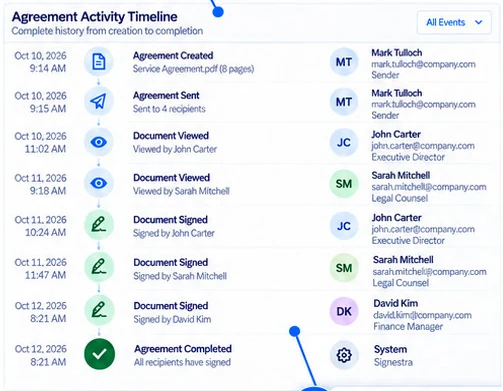
Maintain a clear, traceable history from the moment an agreement is created through final completion.
Signestra maintains a detailed activity history for each agreement, recording key events as documents move from preparation and delivery through viewing, signing, and completion. Authorized users can review the agreement record and access its associated completion information from one centralized location.
Signestra
Certificate of Completion
The agreement and its associated completion information, connected in one record.
Illustrative completion record
Follow key events throughout the agreement lifecycle.
See when recorded actions occurred.
Understand how participants interacted with the agreement.
Maintain documentation associated with the completed transaction.
Keep agreement information connected.
The signature completes the agreement. The record tells the story.
06 / Enterprise administration
Centralized administration, organizational control, and dedicated support make Signestra ready for enterprise-wide use.
Signestra is designed for organizations where electronic signatures extend across departments, teams, and business processes.
Centralized administration gives authorized personnel the tools to manage users, establish permissions, configure organizational settings, and maintain visibility across the platform.

Manage the environment from one place.
Control who can access what.
Configure Signestra around organizational requirements.
Understand platform and agreement activity.
Signestra Premier Support
Signestra Premier Support provides organizations with ongoing assistance as they deploy, administer, and use the platform.
Help prepare the organization for deployment.
Guidance for personnel responsible for managing the platform.
Support for day-to-day product questions.
A defined path for identifying and resolving product-related issues.
We’re here for more than launch day.
Let’s move forward
Bring preparation, signing, workflow management, agreement visibility, and accountability together in one enterprise e-signature platform.
Secure signatures.
Complete accountability.
Tell us about your organization and what you’d like to accomplish.